# Integration Doc

## <mark style="color:purple;">Sign Up & Set Up</mark>

Before you can integrate Real Opinion with your project, you will need to create an account and set up an app on our dashboard.

The first step for every integration is to [signup for a publisher account](https://publisher.realopinions.ai/register) with Real Opinion. Make sure to wait untill your account gets verified, as you won't be able to continue without that.

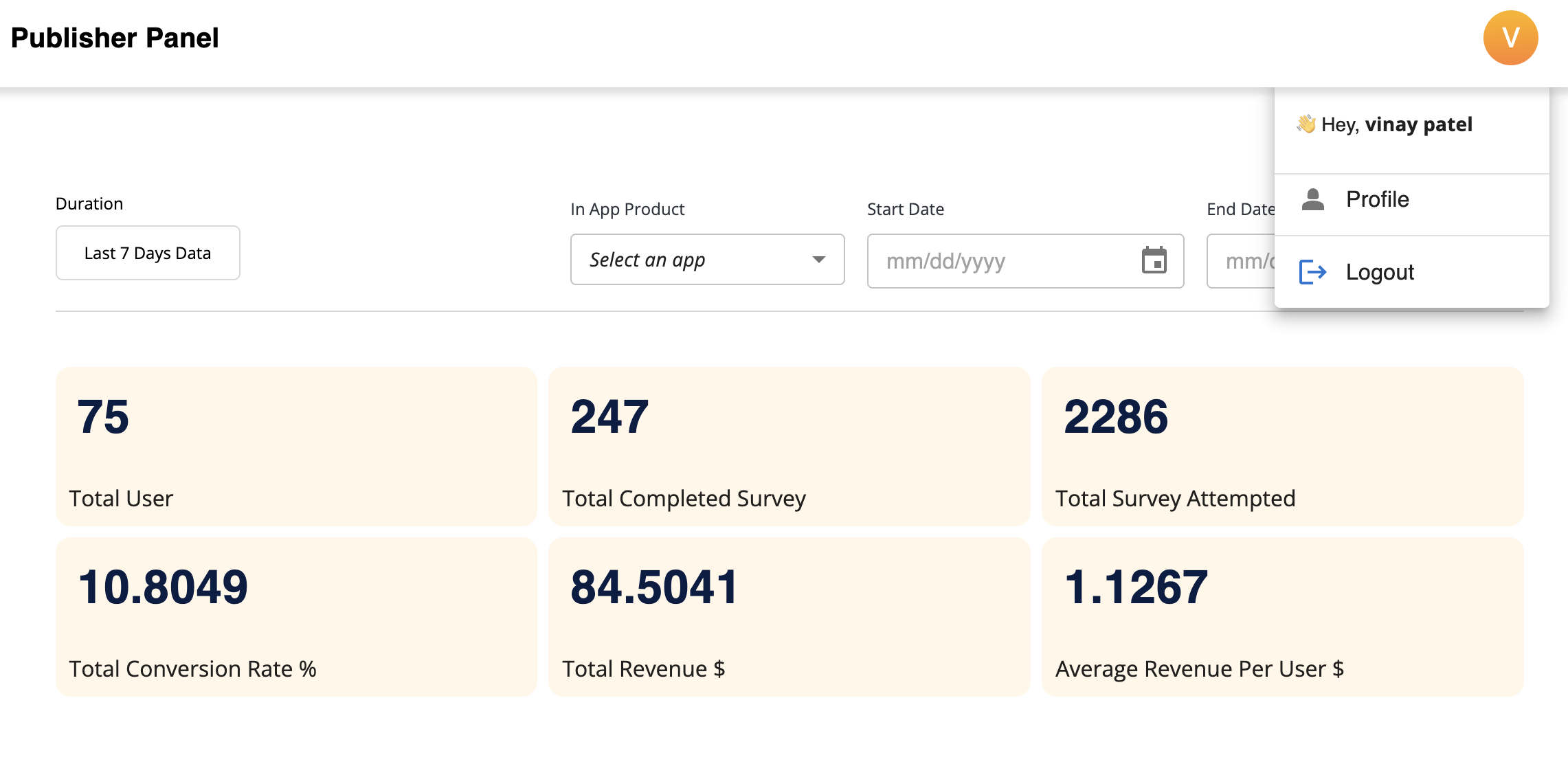
Once your account gets verified, login your account and setup your "Profile" by clicking Profile button on the top right of the screen.

<figure><img src="https://2747942252-files.gitbook.io/~/files/v0/b/gitbook-x-prod.appspot.com/o/spaces%2FdIVyky5RATWUwuj8Asnd%2Fuploads%2FIzkEVjJYnj7Q9KmyK0fO%2FScreenshot%202025-07-01%20at%206.01.29%E2%80%AFPM.png?alt=media&#x26;token=098a4e7e-317a-475e-9f8a-93a1e8d9d3d5" alt=""><figcaption></figcaption></figure>

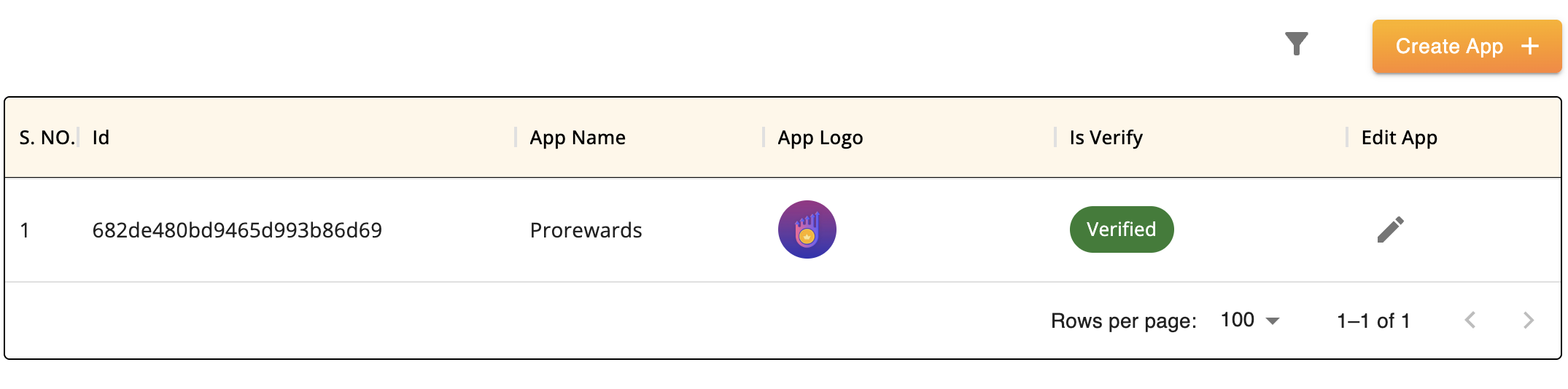
After setting up your profile, add your app integration by clicking on the "App List" section in the sidebar, and then click the "CREATE APP" button to add your app.

On the Real Opinion dashboard, every integration is referred to as "app". Each app will have its own API token and your user data is stored on a per-app level basis. It is recommended that you create one app for each project. Example: if your project is available on Web, iOS, and Android, you have to create three different app on the dashboard for respective platforms.

Now it is time to create your first app. Go the the "[App List](https://publisher.realopinions.ai/apps/create-app)" of the dashboard and click the "CREATE APP" button in the top right corner to do so.

<figure><img src="https://2747942252-files.gitbook.io/~/files/v0/b/gitbook-x-prod.appspot.com/o/spaces%2FdIVyky5RATWUwuj8Asnd%2Fuploads%2FOIyO5Nt7piiTTJHVDiDY%2FScreenshot%202025-07-01%20at%206.06.44%E2%80%AFPM.png?alt=media&#x26;token=b999350e-24eb-438d-a664-f0542d1a0b99" alt=""><figcaption></figcaption></figure>

Your app settings are always accessible on the "App List" section in the left sidebar of the dashboard.

## <mark style="color:purple;">Create your app</mark>

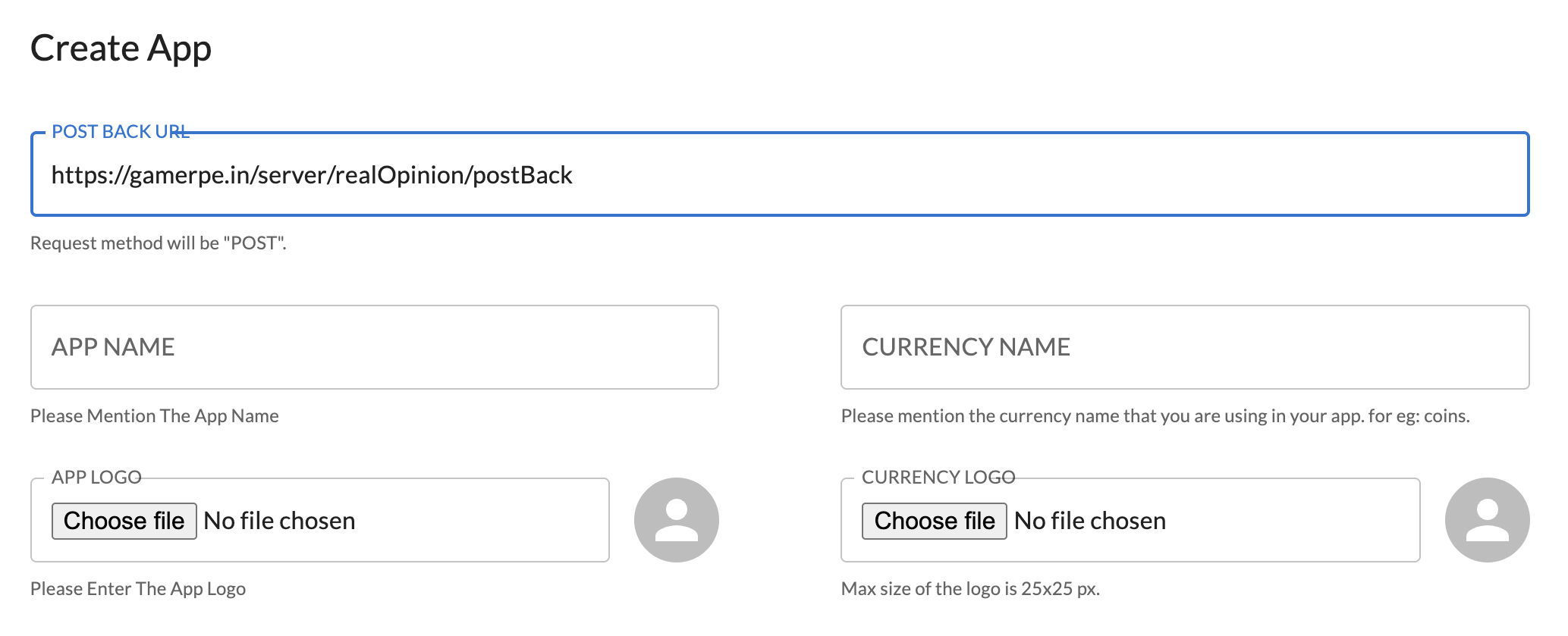
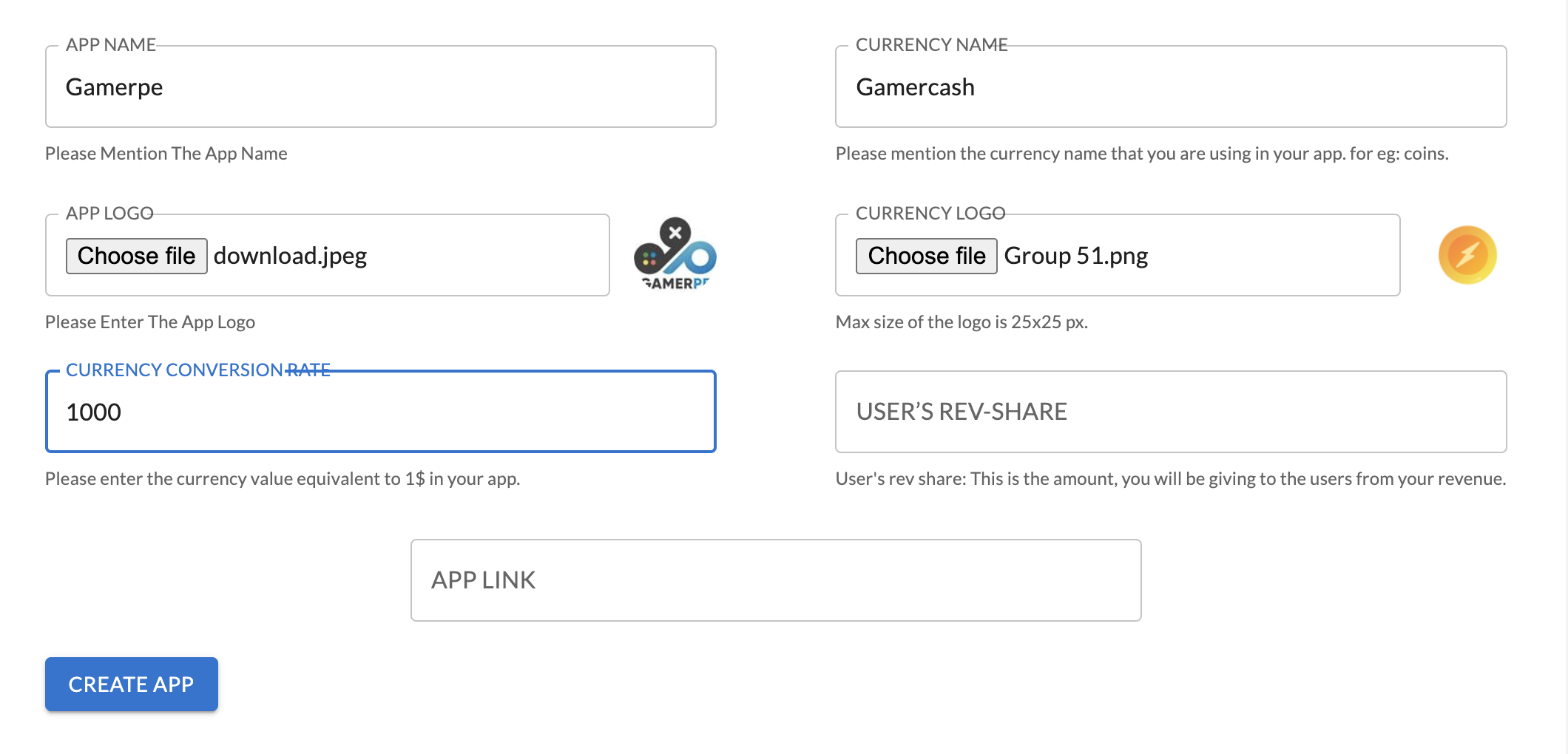
On the "Create App" page you need to fill the general settings that change the behavior of the offerwall. All settings are changed immediately when you save them, so it is possible to adapt the live version of the quizwall in your app. All the general settings in "Create App" page are listed below :<br>

* Enter Postback URL  : Add your postback URL on which you want you want to get the postback hit from Real Opinion server. This entry is mandatory. We call this URL every time a new event is created (e.g. User Complete a Survey, User screened out).

<figure><img src="https://2747942252-files.gitbook.io/~/files/v0/b/gitbook-x-prod.appspot.com/o/spaces%2FdIVyky5RATWUwuj8Asnd%2Fuploads%2F5Ed8Ast6lqnOohwMOV52%2FScreenshot%202025-06-05%20at%2012.30.04%E2%80%AFAM.png?alt=media&#x26;token=336b9a37-aae7-4e5a-8222-bc174b82f3eb" alt=""><figcaption></figcaption></figure>

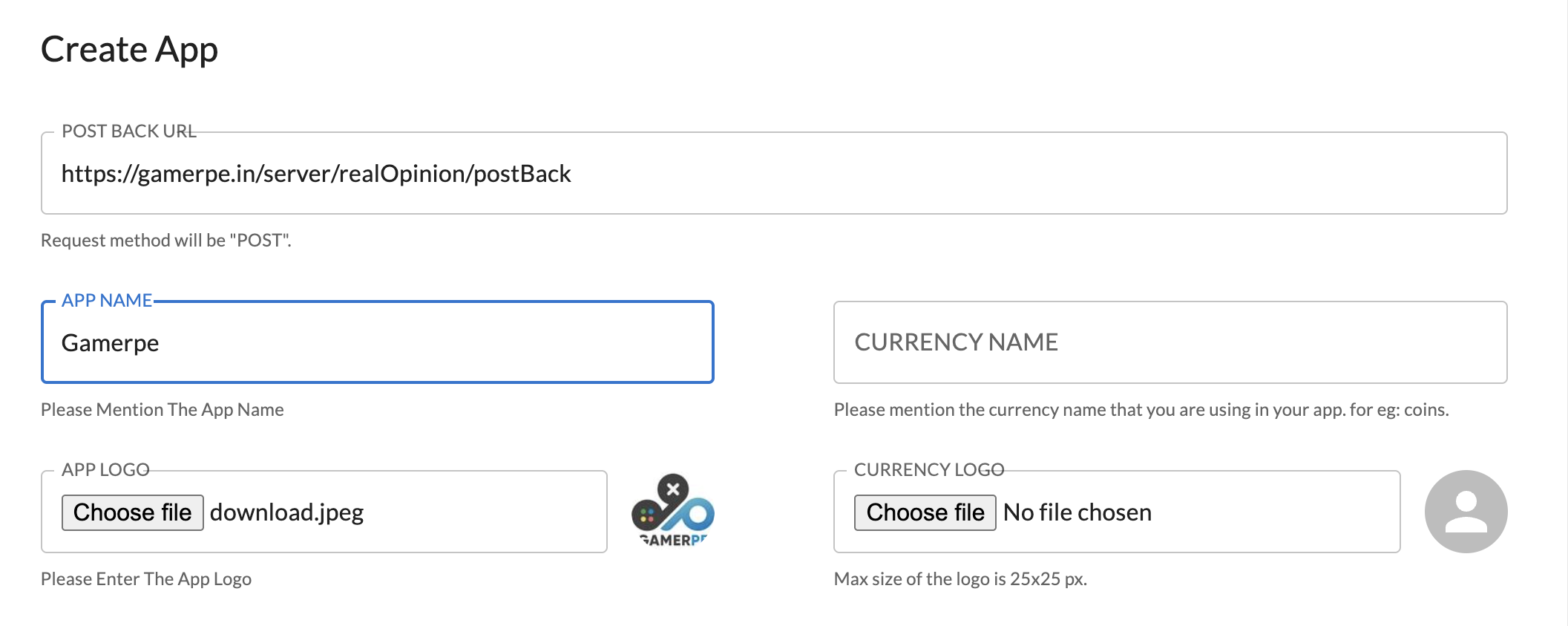
* App Name and App logo : Add your App Name and App Logo, you can always change your app name. It is not displayed to your users/players, therefore you can use technical naming conventions here if needed. Please avoid naming it "Real Opinion" or "App" as it might be harder to track issues when you are talking to our partnerships team.

<figure><img src="https://2747942252-files.gitbook.io/~/files/v0/b/gitbook-x-prod.appspot.com/o/spaces%2FdIVyky5RATWUwuj8Asnd%2Fuploads%2FJo8LSRKFNmkotZmZzcd3%2FScreenshot%202025-06-05%20at%2012.43.27%E2%80%AFAM.png?alt=media&#x26;token=841eaf47-77f1-4f96-99e9-f4a65ea36b98" alt=""><figcaption></figcaption></figure>

* Currency Name and Logo : Add your currency name and logo as per your choice, which can always be editable.

<figure><img src="https://2747942252-files.gitbook.io/~/files/v0/b/gitbook-x-prod.appspot.com/o/spaces%2FdIVyky5RATWUwuj8Asnd%2Fuploads%2F6uGhhT3w6AXqHkNH7ONQ%2FScreenshot%202025-06-05%20at%2012.48.26%E2%80%AFAM.png?alt=media&#x26;token=1c898ec8-5ced-4d5d-abe5-1d7f5faeeb1d" alt=""><figcaption></figcaption></figure>

* Currency conversion rate : Enter the amount of your app's in-app currency (coins, points, etc.) that is equal to **1 USD**. This helps in accurately converting earnings and setting up rewards based on real-world value.

  *Example:* If 1000 coins in your app = $1, then enter **1000**.

<figure><img src="https://2747942252-files.gitbook.io/~/files/v0/b/gitbook-x-prod.appspot.com/o/spaces%2FdIVyky5RATWUwuj8Asnd%2Fuploads%2FGbzSGuXaTJoJYRbMim9p%2FScreenshot%202025-06-05%20at%201.04.39%E2%80%AFAM.png?alt=media&#x26;token=f665a8c5-56bf-4d8f-9ef7-b187fbe44052" alt=""><figcaption></figcaption></figure>

* User's Rev-share : This is the percentage of your total revenue that you want to share with your users. It determines how much of your earnings from each survey will be given to the user as a reward.\
  \
  **Example :** If your revenue from a survey is 10 USD and you set the **User’s Rev Share** to 5**0%**, the user will receive 5 USD, and you will keep **5 USD** as your profit.

  This helps you manage user rewards while still retaining a portion of the earnings for yourself.

<figure><img src="https://2747942252-files.gitbook.io/~/files/v0/b/gitbook-x-prod.appspot.com/o/spaces%2FdIVyky5RATWUwuj8Asnd%2Fuploads%2FaFfAnqCO6sMXdchjgDiz%2FScreenshot%202025-06-05%20at%201.06.42%E2%80%AFAM.png?alt=media&#x26;token=8b3eb0b6-53ca-44ca-9dd5-ee5584273052" alt=""><figcaption></figcaption></figure>

* Enter App Link : Please enter the official link of your app (e.g., Play Store or App Store). This helps us verify the authenticity of the app and ensure that it is published by a genuine developer.

<figure><img src="https://2747942252-files.gitbook.io/~/files/v0/b/gitbook-x-prod.appspot.com/o/spaces%2FdIVyky5RATWUwuj8Asnd%2Fuploads%2FrrKH7PKXhdRxjrqfcYnm%2FScreenshot%202025-06-05%20at%201.12.27%E2%80%AFAM.png?alt=media&#x26;token=a0c8de76-354d-4e3f-bb67-a5d4eeafe044" alt=""><figcaption></figcaption></figure>

**After filling in all the above fields, click on the "CREATE APP" button.**\
Please make sure to wait until your app is verified, as you won’t be able to proceed further without the verification.\
\
After the successful verification of your app, your are all set to add Real Opinion on your platform.&#x20;

## <mark style="color:purple;">Explanation of Integration Properties​</mark>

Example URL : [https://user.realopinions.ai/?app\_id={](https://user.realopinions.ai/?app_id=67e6c58056f5eab87fd305bb\&user_id=671c08ae878613706bb9174f\&email_id=acashvg123%40gmail.com)APP\_ID[}\&user\_id={](https://user.realopinions.ai/?app_id=67e6c58056f5eab87fd305bb\&user_id=671c08ae878613706bb9174f\&email_id=acashvg123%40gmail.com)YOUR UNIQUE ID[}\&email\_id=](https://user.realopinions.ai/?app_id=67e6c58056f5eab87fd305bb\&user_id=671c08ae878613706bb9174f\&email_id=acashvg123%40gmail.com){EMAILID}

| Property | Type   | Description                      | Required |
| -------- | ------ | -------------------------------- | -------- |
| app\_id  | string | This is a unique id to app       | true     |
| user\_id | string | This is unique id for user       | true     |
| email    | string | This is Unique email id for user | true     |

Note - "app\_id" will be generated once your create an app.<br>

## <mark style="color:purple;">Callback API Documentation</mark>

Upon successful completion of a withdrawal, the Real Opinion system will issue an HTTPS POST JSON request with the following data to your specified Success Callback URL.\
\
**Endpoint**:\
Your URL : [https://yourdomainname.com/path/to/your/successendpoint](http://yourdomainname.com/path/to/your/successendpoint)

### 🔐 Authentication

**Recommended:** Protect this endpoint using IP whitelisting .\
IP :  13.204.104.17 ,  13.204.128.57

### 🧾 HTTPS Request

* Method: POST
* Content-Type: application/json

### 📝 Request Body

#### 🔧 JSON Payload

Define the structure for the request payload using the following JSON schema:

```json
{
  "app_id": "string",           
  "user_id": "string",          
  "status": 1,                  
  "trans_id": "string",         
  "publisher_payout": 1.5,      
  "user_payout": 1.0,                   
  "bonus_amount": 0.2           
}
```

## <mark style="color:purple;">Explanation of Callback Properties</mark>

<table><thead><tr><th width="162.35546875">Property</th><th width="107.49609375">Type</th><th width="262.2421875">Description</th><th>Required</th></tr></thead><tbody><tr><td>app_id</td><td>string</td><td>App identifier on your platform</td><td>true</td></tr><tr><td>user_id</td><td>string</td><td>Unique identifier for the user who completed the offer</td><td>true</td></tr><tr><td>status</td><td>number</td><td>Status of the transaction (1 = success, 2 = failed)</td><td>true</td></tr><tr><td>trans_id</td><td>string</td><td>Unique transaction ID from the offer wall</td><td>true</td></tr><tr><td>publisher_payout</td><td>number</td><td>Amount paid to the publisher (in USD )</td><td>true</td></tr><tr><td>user_payout</td><td>number</td><td>Amount earned by the user (in USD)</td><td>true</td></tr><tr><td>bonus_amount</td><td>number</td><td>Any additional bonus given to the user (in USD)</td><td>true</td></tr></tbody></table>

✅ Example Request

{% code fullWidth="false" %}

```json
{
  "app_id": "682de480bd9465d993b86d69",  
  "user_id": "user_12345",             
  "status": 1,                         
  "trans_id": "txn_7890",              
  "publisher_payout": 1.5,             
  "user_payout": 1.0,                           
  "bonus_amount": 0.2                  
}
```

{% endcode %}

#### Example Request

Include the JSON payload in your API call to notify the server about the transaction, along with any additional bonuses awarded.\ <br>

### 📤 Success Response

When the transaction is processed successfully, the server returns a 200 OK status with the following JSON response:

```json
{
  "success": true,
  "message": "Callback received and processed successfully."
}
```

<br>

### **❌ Error Response**

Status Code: 400 Bad Request / 500 Internal Server Error

```json
{
  "success": false,
  "message": "Invalid request or internal error occurred."
}
```

### 💡 Notes

#### Callback Handling Best Practices

When dealing with callbacks, it's essential to adhere to specific standards to ensure system reliability and integrity:

* **Status Codes:** Ensure the <mark style="color:green;">`status`</mark> number accurately reflects the callback outcome:
  * <mark style="color:green;">`1`</mark> indicates success.
  * <mark style="color:green;">`2`</mark> signifies failure.
* **Transaction ID:** The <mark style="color:green;">`trans_id`</mark> must be unique. Duplicates can cause significant transaction errors and data inconsistencies.
* **Data Validation:** Before processing rewards, thoroughly validate:
  * <mark style="color:green;">`user_id`</mark>
  * <mark style="color:green;">`offer_id`</mark>
  * Relevant financial <mark style="color:green;">`amounts`</mark>

Above given is the complete Doc for Real Opinion Integration but if there is any query then please contact us on <mark style="color:green;"><ayush@gamerpe.in></mark>.
